Every tool your team needs. One calm workspace.
Adda puts chat, calls, projects, documents, goals and creative requests in one place, so your team stops tab-switching and starts shipping.
Every signup is reviewed by a human. No credit card needed.
- Web and Windows
- Android app
- Calls included
- Private workspaces
One login instead of eight
Replaces your stack
Most small teams pay for a chat app, a task tracker, a docs tool, a meeting app and a spreadsheet for goals. Adda is all of them, wired together.
Team chat app
Adda Chat
Task tracker
Adda Projects
Docs and wiki
Adda Documents
Video meetings
Adda Calls
OKR spreadsheet
Adda Goals
Design request form
Adda Creatives
Online whiteboard
Adda Whiteboard
Booking tool
Adda Calendar
One workspace, one search box, one bill. Free for teams under 10.
Take the tour
See how your team works in Adda
Pick a module to see it in action. Turn on what your team needs and ignore the rest.
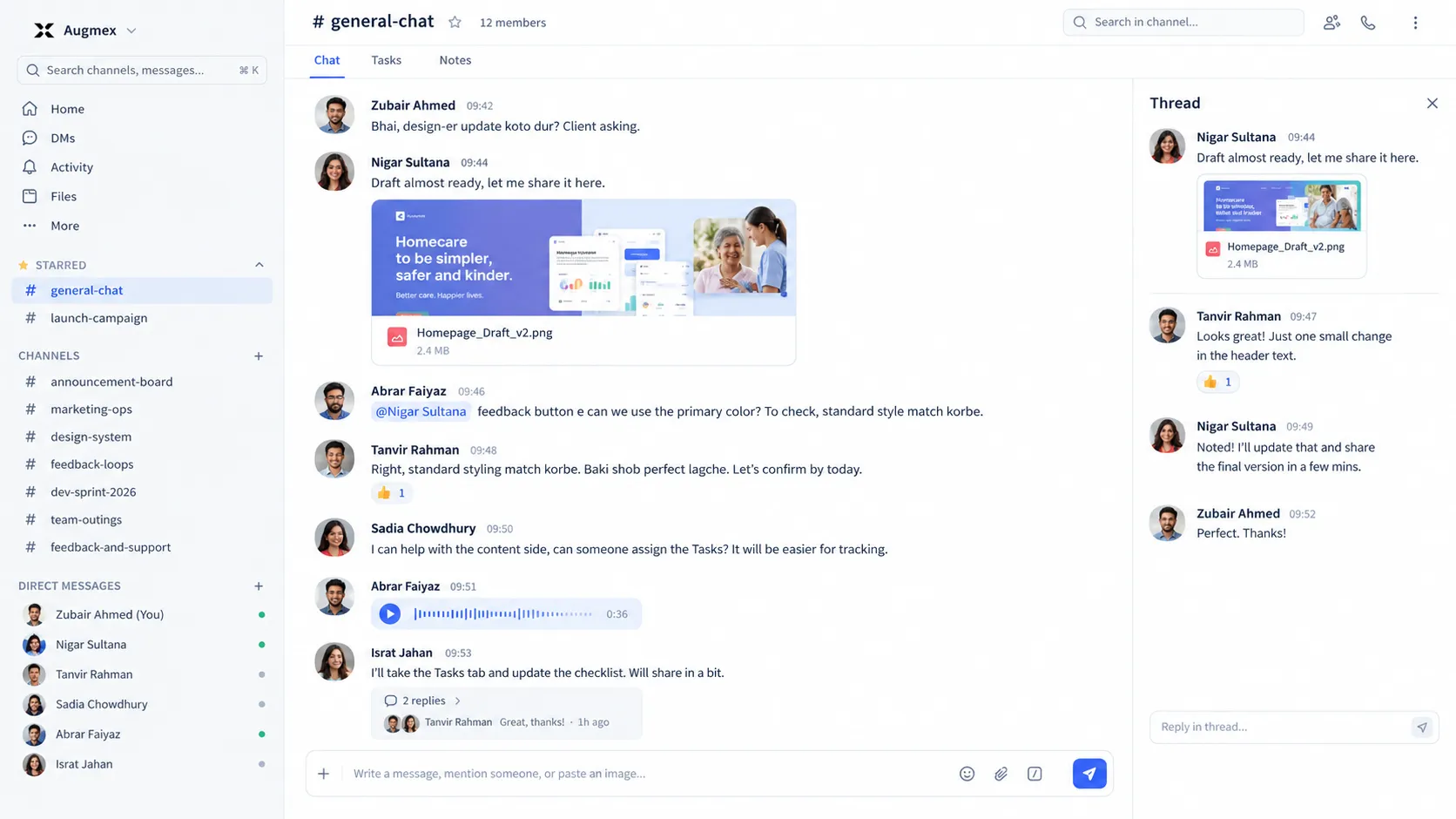
Conversations that stay out of the way
Channels, DMs and threads for everything your team needs to say, without the noise of a dozen separate tools.
- Threads, mentions and reactions that keep context
- Voice notes, polls and scheduled messages
- Browser, desktop and Android notifications
Threadin # design
4 repliesFarhan Siddiq 10:02
New onboarding screens are up. @Nadia R. can you review before standup?
Nadia Rahman 10:05
Design review call
Live now, 3 people
A project board engineers actually use
Sprints, statuses and dependencies that mirror how your team really ships.
- Board, backlog, timeline, calendar and workload views
- Time tracking and worklogs on every issue
- Releases, QA runs and sprint analytics
Sprint 14
14 of 19 points doneTo do
ENG-47
Empty states for the board
ENG-51
Import old notes
In progress
ENG-42
Checkout polish
Done
ENG-39
Release 2.4 regression
ENG-40
Onboarding doc
Docs that live next to the work
Write it once, link it anywhere. No more hunting through folders for the latest version.
- Real-time editing with version history
- Comments, uploaded files and restricted sharing
- Export to PDF or Word in one click
Release 2.4: booking links
"Great doc, one comment left on the pricing section."
Goals the whole company can see
Company, department, team and individual objectives that line up, with honest progress.
- OKRs with cycles, check-ins and approvals
- An alignment tree showing how work rolls up
- Progress that updates itself from linked projects
Q3 goals
On trackCompanyShip the new checkout
82%
DesignRebrand the mobile app
64%
Growth500 booked demos
41%
Audio and video calls, no installs
Start a call from any channel or DM. Nobody needs another app or another link.
- One-click audio and video from any conversation
- Scheduled calls with a shareable join link
- Works in the browser, on Windows and on Android
design standup
Live 12:04Design requests from brief to published
Every brief, asset, comment and revision round in one record, so nothing gets lost in a chat scroll.
- A clear status line from Pending to Published
- Images, videos and PDFs grouped by round
- An output report for team leads
Creative request
Autumn campaign: social banners
Requested by Tanvir A. · Due Friday
Pending
Working
Approval
Completed
Published
Love the story version. Can the logo sit a little higher on the banner?
What's inside
Eight modules. One workspace.
Every module shares the same people, search and notifications.
Chat
Channels, DMs, threads, voice notes and calls. The conversation stays next to the work.
Projects
Boards, backlogs, sprints, dependencies, releases and test runs for real delivery.
Documents
Collaborative docs with versions, comments and department-level visibility.
Whiteboard
An infinite canvas for planning, diagramming and thinking out loud, together.
Goals
OKRs with check-ins, approvals and an alignment tree from company to individual.
People
Departments, reporting lines and birthdays. Your org, not a spreadsheet.
Calendar
Team events, meetings and booking links that clients can use without an account.
Creatives
Design and marketing jobs from brief to published, with rounds, assets and reporting.
Plus an AI assistant, automations and one search across all of it.
Built for your team
Made for how small teams really work
For agencies
Client work and creative requests in one place
Projects, design jobs and client calls, with a per-person output report.
Learn moreFor software teams
Sprints, releases and QA next to the chat
A tracker engineers actually use, plus inbound webhooks from your pipeline.
Learn moreFor remote teams
Stay in sync across rooms and time zones
Calls with no installs, live presence and an AI summary of what you missed.
Learn morePricing
Free under 10. Simple above that.
Small teams pay nothing, and there is no credit card anywhere in the product.
Free
For teams under 10 people
$0forever
Request your account- A complete workspace for your team to chat, plan and ship
- Audio and video calls
- Web, Windows desktop and Android apps
- Realtime updates across your devices
- One search across all of your team’s work
- Your own private, isolated workspace
Business
For teams of 10 and up
Let’s talk
Talk to us- Everything in Free, for the whole company
- A guided set-up session for your team
- Departments, reporting lines and role-based module access
- Company goals with alignment and analytics
- Priority support from the people who build Adda
Private by design
Your workspace is yours alone
Isolated by company
Every team gets its own workspace. Nothing leaks between companies, and foreign links simply do not exist.
Approved members only
There is no public signup. Accounts are created when a workspace admin invites someone, and access can be switched off instantly.
Sane permissions
Roles, departments, project membership and document visibility are checked on every read and write.
Questions
Frequently asked
How do I get my team on Adda?
Request an account with your company name and team size. A person reviews every request, sets up your workspace, and emails you a private link to set your password. No credit card, no self-serve forms.
Is it really free?
Yes. Teams under 10 people use Adda for free, for as long as they like. No credit card required, and the Windows and Android apps are part of it. Bigger teams can talk to us and we will set things up together.
Can I try it before requesting a workspace?
Yes, request a demo and we will walk you through Adda with your team’s kind of work, then set up your workspace if it fits.
Where does our data live?
Every company gets its own isolated workspace. Your channels, projects, documents and goals are never shared, and there is no public signup: only people you approve can join.
Ready to calm the chaos?
Tell us about your team and we will set up your workspace, free, in about a day.